MeeGo Wallpapers: Give Your Android the Nokia N9 Look
If you’re a true fan of the Nokia N9, you know that the “MeeGo experience” isn’t just about icons—it’s a whole aesthetic. While downloading the MeeGo Icon Pack APK is the first step, choosing the right wallpaper is the key that gives your Android home screen that classic and premium feel.
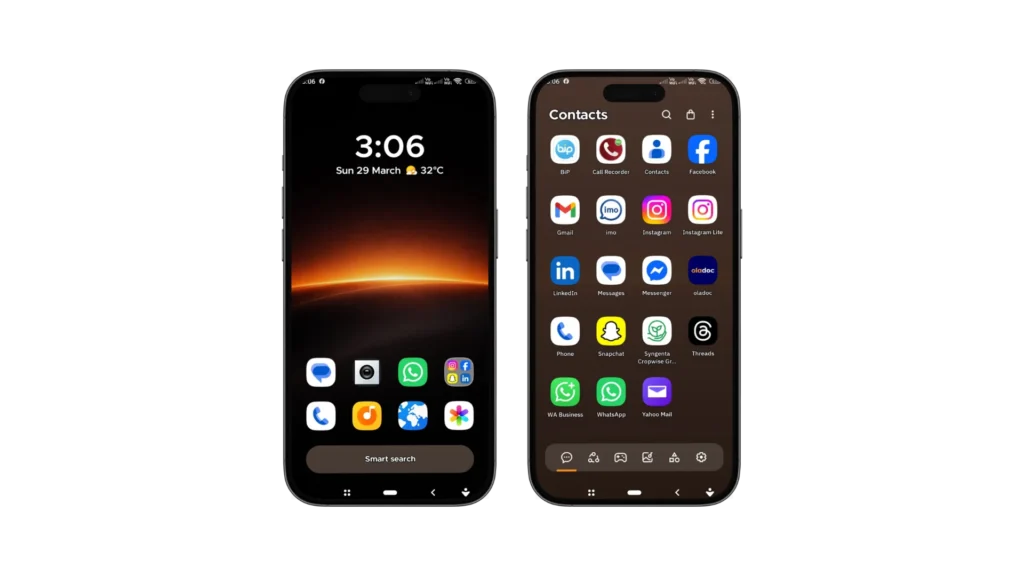
Download Premium Wallpapers
We have picked the best MeeGo style wallpapers that perfectly complement the iconic squircle shape and glossy finish of the MeeGo interface. Whether you prefer a clean flat design or a dark AMOLED setup, these wallpapers will make your icons look amazingly beautiful.
How to download Wallpapers
To download these premium wallpapers, click on the wallpaper you selected for your Meego setup (Meeye or Meeyo). It will open the wallpaper in a new tab. Right click on the wallpaper in the new tab and click the “Save As” Option.


MeeGo Design Philosophy
The Nokia N9’s MeeGo OS was way ahead of its time. It introduced “The Squircle” design language—a mathematical mix of a square and a circle. The shape was soft and organic.
To make these icons look good, the original designers always used deep gradients and minimalist abstractions. If the wallpaper is too “busy” or crowded, the beauty of the Meeye and Meeyo icons gets obscured. That’s why you need a backdrop that creates a clean canvas and lets the vibrant colors of the icons stand out.
Top Categories of MeeGo Wallpapers
Original Nokia N9 Abstracts (The Classic Vibe)
If you want that same old nostalgia, there’s nothing better than the N9’s original color palette. These wallpapers feature smooth gradients of cyan, magenta, and amber. These colors match the system icons perfectly. Users who want their Android to feel like a 2011 Nokia flagship.
Modern Flat & Minimalist Designs
Because we’re in 2026, many users prefer a crisp and modern look. Our flat design wallpapers use solid pastel colors and light geometric patterns. Flat design, Minimalist, Clean UI. High-resolution screens where you want the Meeyo icons to appear sharp.
Dark & AMOLED Optimized Backgrounds
If you like “Dark Mode,” this category is for you. These wallpapers feature deep blacks (#000000) and light shades of blue or gray. Colorful squircle icons on a dark background appear to glow on the screen. Using the Meeye icon pack with a dark wallpaper saves battery and doesn’t strain the eyes
How to match wallpapers with Meeye and Meeyo icons?
Not every wallpaper suits every icon pack. Here’s how to find the right combination:
For Meeye icons: Because Meeye icons have more detail and a “glossy” finish, they look better against lightly blurred photography backgrounds or soft gradients.
For Meeyo icons: These icons are flatter and bolder. Vibrant solid colors or high-contrast geometric abstracts are best for these.
How to Apply These Wallpapers on Android
Setting up your home screen is very easy. Once you’ve downloaded the high-quality image of your choice, follow these steps:
Download the APK: First, install the MeeGo Icon Pack APK from our main page.
Launcher Setup: Open your favorite launcher (Nova, Niagara, or Smart Launcher).
Set the Background: Long-press on the home screen, select “Wallpapers,” and set the downloaded MeeGo-style image.
Icon Size: For the best look, we recommend setting the icon size to 115% or 125% in the launcher settings to ensure the squircle shape is clearly visible.
Quality and Resolution (HD & 4K)
We don’t rely on low-quality or stretched images. Every wallpaper on meegoicons.com is hand-selected and optimized for modern Android smartphones. Whether you have a budget phone or a flagship with a 4K display, these wallpapers will look premium on every screen.
Conclusion: Complete Setup
Android customization is a fun. The combination of MeeGo Icon Pack and these exclusive wallpapers is more than just a theme, it’s a way to revive mobile history. From the classic nostalgia of the N9 to today’s modern flat aesthetics, our collection has something for every fan.